Physical Address
304 North Cardinal St.
Dorchester Center, MA 02124
Physical Address
304 North Cardinal St.
Dorchester Center, MA 02124
Table of Contents
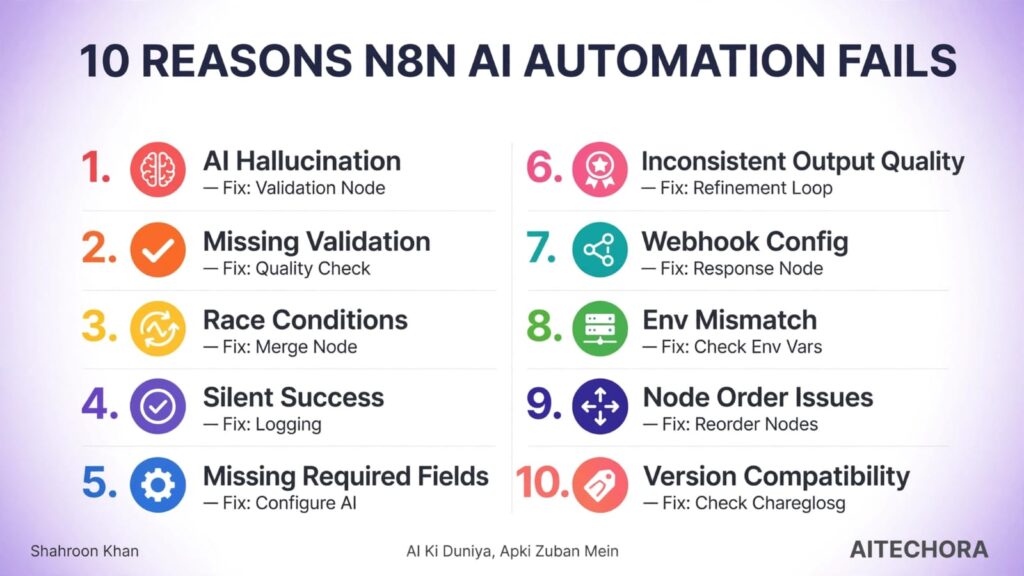
n8n AI automation randomly fail 10 common reasons ki wajah se hoti hai. Sabse common: AI hallucination (LLM empty output return karta hai bina error ke), missing validation layer, race conditions in parallel branches, silent workflow success (runs but does nothing), missing required fields (AI Agent without language model), inconsistent AI output quality (refinement cycles nahi hain), webhook response configuration issues, deployment vs local environment mismatch, node order issues, aur version compatibility problems. Fix: har workflow mein validation layer add karo, error branches connect karo, aur systematic debugging checklist follow karo.
Note: silent failures ek genuine, widely-reported n8n community problem hai. Is article mein diya gaya koi bhi exact percentage claim nahi kiya gaya hai kyunki failure rate workflow-se-workflow alag hoti hai — koi universal official stat exist nahi karta.
Socho — aapne n8n mein ek AI automation workflow banaya. Sab sahi chal raha tha. Phir achanak se — workflow fail ho gaya. Bina kisi error message ke. Koi warning nahi. Koi log nahi. Bas silent failure.
Aap n8n dashboard pe gaye. Workflow “Success” show kar raha hai. Par data kahan hai? Output kahan hai? Kuch nahi.
Mere saath bhi aisa hua tha.
Maine ek AI agent workflow banaya — customer support emails ko automatically reply karne ke liye. Pehle 10 emails sahi gaye. Phir 11th email pe — workflow run ho gaya, “Success” show kiya, par koi reply generate nahi hua.
Maine socha — “Kya ho gaya? Error toh nahi dikh raha.”
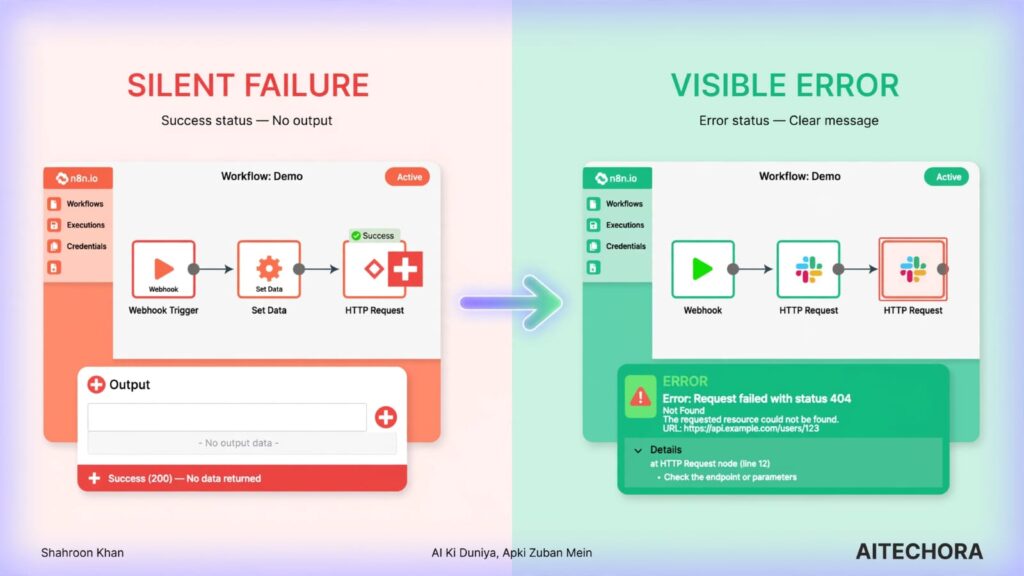
Phir mujhe pata chala — yeh error nahi, silent failure hai. AI ne empty output return kiya, par n8n ne use “success” maan liya. Kyunki maine validation layer nahi add kiya tha.
Analogy: Jaise aap kisi ko bhej rahe ho parcel. Delivery boy ne parcel “delivered” mark kar diya. Par receiver ko parcel mila hi nahi. System “success” bol raha hai, par actual kaam nahi hua. n8n AI automation mein bhi yahi hota hai — workflow “success” show karta hai, par actual output missing hai.
Yahi wo pattern hai jo is guide mein hum systematically todenge — automation randomly fail kyu hoti hai, iske 10 reasons kya hain, aur har ek ko kaise pakdein.
Agar aap n8n ke error-handling built-in features (Error Trigger, Error Workflow) ke baare mein deeper jaana chahte ho, n8n ki official error handling documentation ek accha starting point hai.
(Related read: agar aap AI tools automation ke saath combine kar rahe ho, humara Best AI Automation Tools for Beginners (2026) guide bhi check karo — aur agar aap PDF-based AI research bhi karte ho, NotebookLM PDF Se Galat Answer Kyu Deta Hai guide bhi kaam aayega.)
Problem:
Sabse common reason — LLM empty ya wrong output return karta hai bina kisi error ke. Model “successfully” run hota hai, par output field blank hai ya garbage data return kar raha hai.
Real Example: Ek e-commerce store owner ne n8n workflow banaya — product descriptions automatically generate karne ke liye, OpenAI integration ke saath. Workflow ran successfully, par output field empty tha. Check karne pe pata chala LLM ne empty response return kiya tha kyunki prompt ambiguous tha — par n8n ne API call ko “success” maan liya kyunki technically call successful thi.
| Solution | How |
| Validation node | AI response ke baad ek validation node add karo jo check kare ki output empty toh nahi |
| Retry logic | Agar empty hai, toh retry ya fallback logic implement karo |
| Prompt engineering | Clear, specific prompts do jo structured output demand karein |
Problem:
n8n workflow “successfully” run ho jaata hai, par output quality zero hai — kyunki validation layer missing hai jo check kare ki actual kaam hua ya nahi.
Real Example: Customer support automation workflow mein AI ne reply generate kiya, par reply sirf generic tha — “Thank you for your email. We will get back to you.” Workflow “success” show kar raha tha, par actual customer support kaam nahi ho raha tha.
| Validation Check | How |
| Empty output | Check karo output field empty toh nahi |
| Minimum length | Output mein minimum characters count karo |
| Keyword check | Specific keywords present hain ya nahi |
| Format check | Output expected format mein hai ya nahi |
Problem:
Parallel branches mein data overwrite ho jaata hai. Ek branch data produce karti hai, doosri branch use overwrite kar deti hai. Result — sirf last branch ka data rehta hai, baaki sab lost.
Real Example: Ek marketing team ne n8n workflow banaya jo social media posts ki multiple variations generate karta tha, 3 parallel branches ke saath. Output mein sirf last branch ka data aata tha — pehle 2 branches ka data overwrite ho gaya tha.
| Solution | How |
| Merge node correctly | Data overwrite na ho, isliye merge node use karo |
| Different variable names | Har branch ka unique variable name rakho |
| Array accumulation | Data overwrite nahi, array mein accumulate karo |
Problem:
n8n workflow “Success” show karta hai, par actual kaam nahi ho raha. Ye sabse dangerous problem hai — kyunki aapko pata hi nahi chalta ki workflow fail ho raha hai.
Real Example: Ek company ne n8n workflow banaya CRM se database tak customer data sync karne ke liye. Workflow “Success” show kar raha tha. 3 weeks baad pata chala — data sync ho hi nahi raha tha. Koi error nahi, koi warning nahi.
| Check | How |
| Data integrity | Check karo actual data source mein changes hain ya nahi |
| Logging | Har major node ke baad log add karo |
| Manual verification | Random samples periodically verify karo |
Problem:
AI Agent node mein required fields missing hain — most common, language model connection missing hona.
Real Example: Ek developer ne AI Agent node add kiya, par OpenAI connection configure nahi kiya. Workflow “success” show karta tha, par AI Agent kuch nahi kar raha tha — koi error message nahi tha.
| Check | How |
| Language model connection | Confirm karo OpenAI/Anthropic connection configured hai |
| Credentials | API keys valid hain ya nahi |
| Model name | Correct model selected hai ya nahi |
Problem:
Agar aap LLM ke pehle hi response ko final answer maan lete ho, bina check ya refine kiye, toh output quality inconsistent ho sakti hai — kabhi acha, kabhi kaam ka nahi. Ye koi n8n-specific built-in feature nahi hai — ye ek general AI-workflow design practice hai: ek review/refine step add karna output ko zyada reliable banata hai.
Real Example: Ek n8n user ne AI content generation workflow banaya jisme AI ka pehla output directly final use ho jaata tha, bina kisi check ke. Workflow “success” show karta tha, par content quality inconsistent thi — kabhi achi, kabhi generic ya incomplete.
| Solution | How |
| Add a review/refine step | AI output ko dobara ek prompt se check/improve karwao before finalizing |
| Quality threshold | Define karo ki kitni quality acceptable hai (length, keywords, format) |
| Retry on fail | Threshold meet na ho toh ek retry attempt add karo |
Problem:
Agar webhook ka response mode “Using Respond to Webhook Node” pe set hai, par corresponding Respond-to-Webhook node missing ya galat configured hai, toh calling system ko response hi nahi milta.
Real Example: Ek developer ne webhook node add kiya, par Respond-to-Webhook node connect nahi kiya. Workflow ran successfully, par external system ko response nahi mila — koi error nahi, bas silent failure.
| Check | How |
| Respond-to-Webhook node | Confirm karo ye node connected hai jab response mode usko point karta hai |
| Response format | Expected format mein response bhej raha hai ya nahi |
| Status codes | Correct HTTP status codes return kar raha hai ya nahi |
Problem:
Workflow local environment mein perfectly chal raha hai, par production mein fail ho raha hai. Environment variables, timezone, dependencies — sab alag ho sakte hain.
Real Example: Ek developer ne workflow local docker mein test kiya, sab sahi chala. Production deploy karne pe randomly fail ho raha tha — timezone mismatch ki wajah se, local mein UTC tha, production mein IST.
| Check | How |
| Environment variables | Confirm karo sab env vars set hain |
| Timezone | Same timezone use karo local aur production dono jagah |
| Dependencies | Version mismatch check karo |
Problem:
Node order matters. Agar Merge ya IF node galat jagah hai, toh data flow break ho jaata hai.
Real Example: Ek user ne Merge node galat jagah daal diya. Workflow “success” show karta tha, par data combine nahi ho pa raha tha — koi error nahi, bas silent failure.
| Check | How |
| Node order | Logical flow mein nodes hain ya nahi |
| Merge node position | Merge node correct place pe hai ya nahi |
| IF node conditions | Conditions correctly configured hain ya nahi |
Problem:
n8n version update ke baad — kuch node behaviours change ho sakte hain ya old nodes deprecated ho jaate hain. Workflow “success” show karta hai, par naye version mein behavior different ho sakta hai.
Real Example: Ek major n8n version update ke baad ek developer ke HTTP Request node ka behavior change ho gaya. Workflow “success” show karta tha, par API call silently fail ho rahi thi.
| Check | How |
| Version changelog | Update se pehle official changelog check karo deprecated/changed nodes ke liye |
| Node compatibility | Old/affected nodes update karo |
| Testing | Update ke baad workflow thoroughly test karo before relying on it in production |
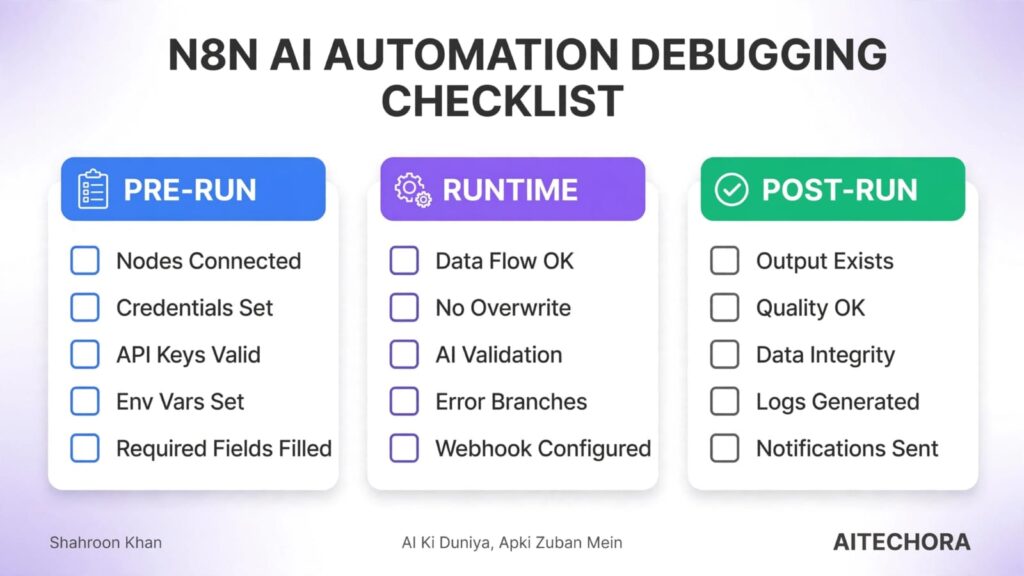
| Step | Check |
| 1 | All nodes connected? |
| 2 | Credentials configured? |
| 3 | API keys valid? |
| 4 | Environment variables set? |
| 5 | Required fields filled (e.g. AI Agent’s language model)? |
| Step | Check |
| 6 | Data flow continuous across all nodes? |
| 7 | Parallel branches not overwriting each other? |
| 8 | AI response validated (not empty/low quality)? |
| 9 | Error branches connected on critical nodes? |
| 10 | Webhook Respond node set correctly, if used? |
| Step | Check |
| 11 | Actual output exists (not just “Success” status)? |
| 12 | Output quality acceptable? |
| 13 | Data integrity maintained end-to-end? |
| 14 | Logs generated for this run? |
| 15 | Notifications sent, if configured? |
| Symptom | Likely Reason | Quick Fix |
| “Success” but no output | AI hallucination / validation missing | Add validation node |
| Parallel branches failing | Race conditions | Check merge node config |
| Works locally, fails in prod | Env mismatch | Check env vars, timezone, deps |
| Webhook not responding | Respond node missing/misconfigured | Configure Respond-to-Webhook node |
| Node update broke workflow | Version compatibility | Check changelog before updating |
| Inconsistent AI output quality | No refinement/validation pass | Add a review step + quality threshold |
| Myth | Reality |
| Error dikhna hi ek failure hai | Bina error ke hone wale silent failures bhi bahut common hain |
| n8n “Success” = kaam ho gaya | “Success” sirf execution complete hone ka matlab hai |
| AI hallucination rare hai | AI hallucination ek bahut common failure reason hai |
| Validation optional hai | Production workflows ke liye validation zaroori hai |
| Workflow once set = done | Monitor karte raho constantly, especially updates ke baad |
Pre-run, runtime, aur post-run checklist upar diye gaye follow karo. Zyaadatar cases mein validation layer missing hota hai — AI response empty ya low-quality hokar bhi “success” mark ho jaata hai.
Environment variables, timezone, aur dependency versions compare karo local vs production.
Har major node ke baad logging add karo, ek validation layer rakho, aur critical nodes pe error branches connect karo — reactive debugging ke bajaye proactive monitoring pe shift karo.
n8n AI automation randomly fail hone ke 10 common reasons hain — aur inme se kaafi silent failures hain: koi error message nahi, koi warning nahi, bas “Success” show karta hai aur kaam nahi hota.
Teen cheezein yaad rakho:
Aur agar workflow randomly fail ho raha hai — sabse pehle check karo ki AI output ek validation/refinement step se guzar raha hai ya directly final use ho raha hai. Yehi sabse common miss hoti cheez hai.
“n8n mein ‘Success’ ka matlab kaam ho gaya nahi hai. Success ka matlab hai — code execute ho gaya. Actual kaam hua ki nahi — ye validation layer decide karegi.”
Agar aapko n8n AI automation related ye article helpful laga, toh ye guides bhi padho:
📄 NotebookLM PDF Se Galat Answer Kyu Deta Hai? 9 Reasons + Fix
NotebookLM ke saath PDF parsing issues face kar rahe ho? Scanned PDF, font encoding, Google Drive glitches — 9 common reasons aur practical fixes jaaniye.
👉 NotebookLM PDF Se Galat Answer Kyu Deta Hai? 9 Reasons + Fix
🤖 Best AI Automation Tools for Beginners (2026)
n8n, Make, Zapier, Microsoft Power Automate — kaunsa tool tumhare liye sahi hai? 5 popular tools ka detailed comparison.
👉 Best AI Automation Tools for Beginners (2026)
⚡ AI Workflow Optimization Guide (2026)
Silent failures, error handling, validation layers, aur monitoring strategies — reliable AI workflows kaise design karein? Complete guide.
👉 AI Workflow Optimization Guide (2026)
Aur suno — agar koi specific AI tool ya workflow issue face kar rahe ho, toh comment karo. Main next article usi pe likhunga! 😊